

Messages (SMS)
Every SMS conversation with your candidates in one place — a people list, the thread as bubbles, delivery receipts and an inline composer with templates and the AI assistant.
What it does
The Messages app (route /apps/texto) shows every text conversation your organization’s SMS number has had — one conversation per candidate, plus one per unknown number — the way a messaging app does: the people on the left, the selected conversation on the right, a composer that never leaves the screen. Whoever on your team sent or received a text, it is here.
The conversation list
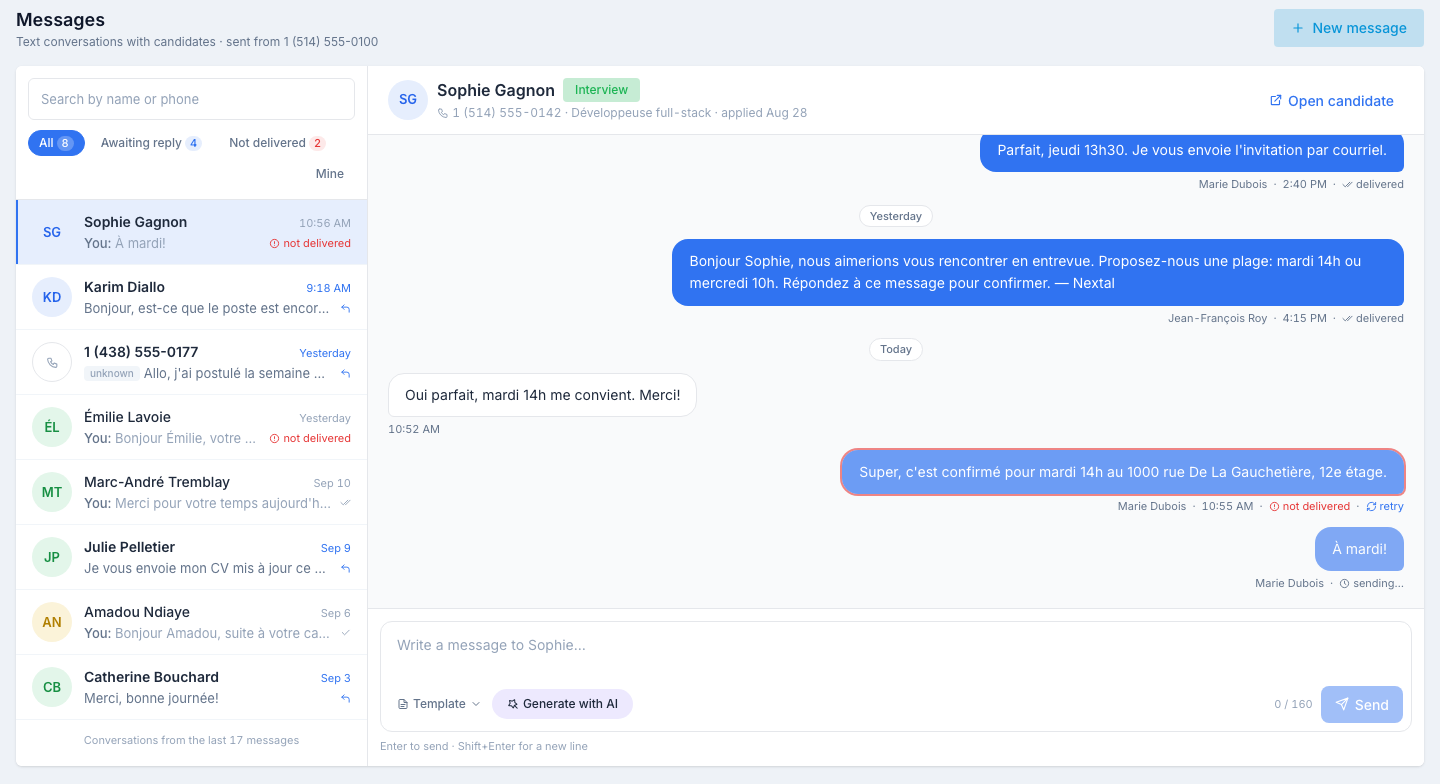
One row per person, most recent conversation first: the candidate’s avatar and name, the last message (yours start with You:), its time, and on the right either the receipt of your last message — not delivered in red — or a reply arrow when the last word is theirs. A number that matches no candidate shows as the number itself with an unknown tag.
Above the rows:
- Search by name or phone — type a name, or a few digits of a number (handy for unknown numbers).
- The All · Awaiting reply · Not delivered · Mine chips, with their counts.
Under the rows, Conversations from the last N messages tells you how far back the list reaches; Load older messages extends it.
What the chips mean
| Chip | Shows |
|---|---|
| All | Every conversation loaded so far. |
| Awaiting reply | Conversations whose last message is the candidate’s — they wrote, nobody answered yet. The conversation leaves this chip the moment you reply. It is not a read / unread state: there is nothing to “mark as read”, answering is what clears it. |
| Not delivered | Conversations with a message that did not arrive. The count is the number of undelivered messages, not of conversations. |
| Mine | Only the conversations where you wrote — the messages your colleagues sent are left out. |
Reading a conversation
Click a row. On the right:
- The toolbar — the candidate’s name and status, their phone number, the job they last applied to and the application date, and Open candidate, which lands on the Texts tab of their profile.
- The thread — your messages (and your colleagues’) in blue on the right, with who sent them, the time and the delivery state; the candidate’s replies in white on the left. A Today, Yesterday or date pill splits the days. The thread opens on the newest message; scroll up to read back, and Jump to latest brings you down again.
Delivery states
| State | What it means |
|---|---|
| sending… | The message is on its way to the SMS provider. The state updates by itself within seconds. |
| sent | The provider accepted the message. |
| delivered | The candidate’s phone received it. |
| not delivered | The message did not arrive (invalid number, phone unreachable…). The bubble gets a red outline and a retry link sends the same text again as a new message — the failed one stays in the thread. |
Writing a message
The composer sits at the bottom of the conversation:
-
Type
Enter sends; Shift+Enter adds a line break.
-
Or start from a template
The Template menu lists your organization’s active SMS templates. Picking one fills the box; adjust it before sending.
-
Or ask the AI assistant
Generate with AI drafts a message from a prompt, aware of the candidate, the job and the conversation so far. You review, then insert. Once there is text, the bar offers Improve, Change tone, Fix spelling and Shorten.
-
Watch the counter
0 / 160 shows the length and how many SMS segments the message will take. Characters outside the basic SMS alphabet (an “ê”, an emoji…) drop the segment size to 70 characters. Above five segments, sending is refused.
-
Send
The bubble appears at once as sending…, the conversation jumps to the top of the list, and the receipt turns to sent / delivered without a refresh.
Starting a new conversation
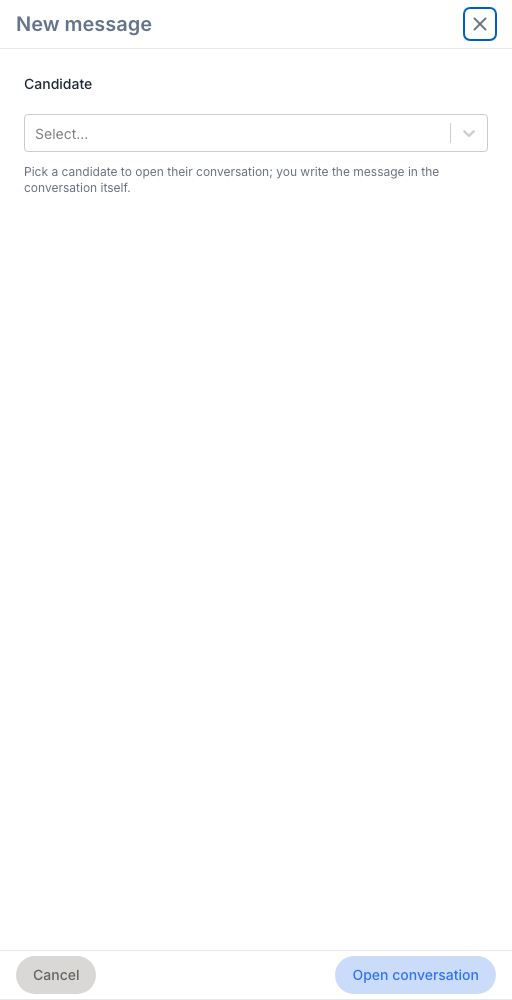
Click New message in the header. A panel asks for the candidate — search by name, email or phone — then Open conversation opens their thread on the right, empty if you never texted them. Write in the composer as usual. The conversation joins the list with the first message.
”Unknown sender” messages
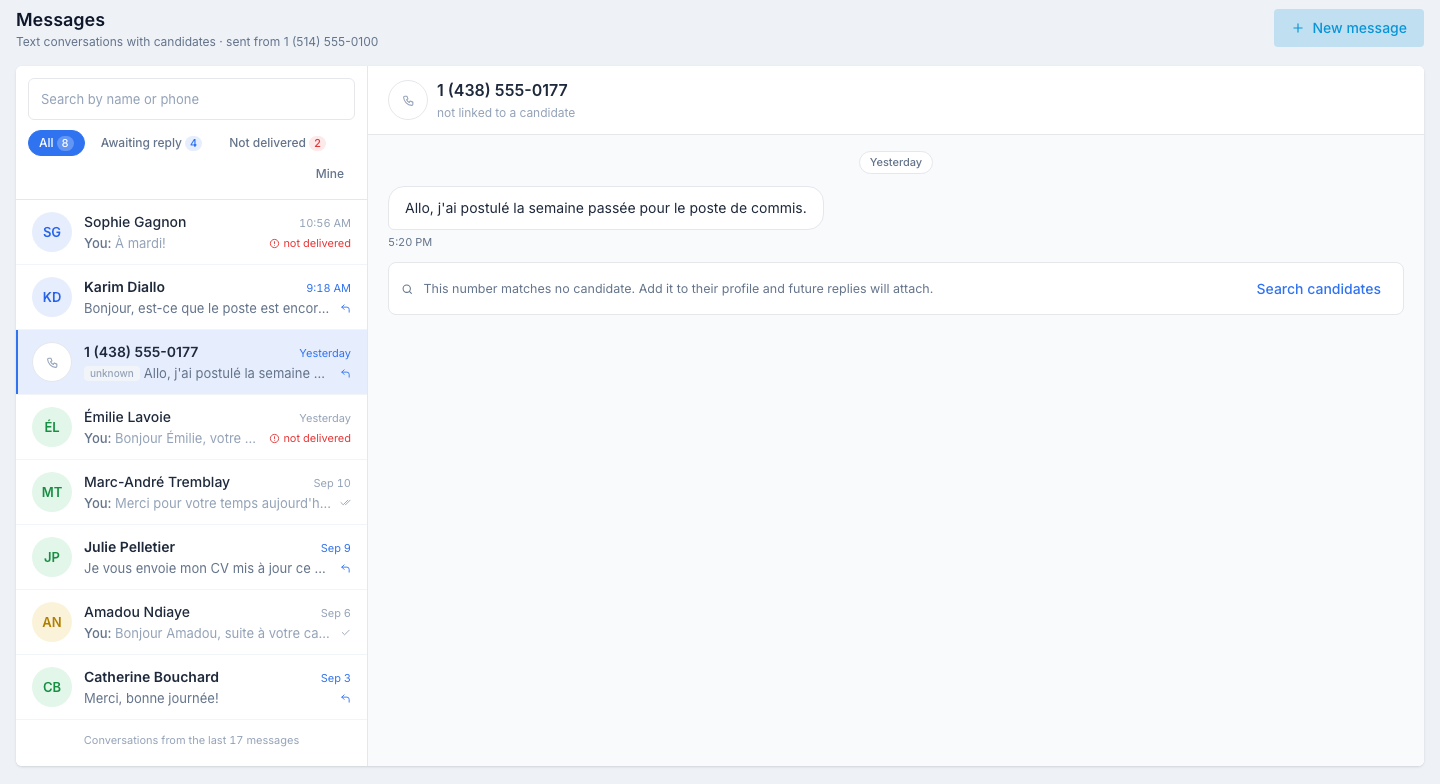
Nextal attaches a reply to a candidate by the number it came from, whatever format the number was typed in on the profile (with or without the country code, dashes, dots, parentheses). When no candidate has that number — or two or more candidates share it — the reply is deliberately left unattached rather than guessed: it shows in the list as the number itself, tagged unknown, and its conversation reads not linked to a candidate. You can read it, not answer it: there is no composer.
What to do
-
Click Search candidates
The bar under the thread opens the candidate list already searched on that number. Numbers are not all entered in the same format, so widen or narrow the search with the last four digits if needed.
-
Fix it depending on what you find
- No record — create the candidate with that number.
- A record without the number — add the number to the profile.
- Two records for the same person — merge the duplicates. Once a single record carries the number, there is no more ambiguity.
- Two different people sharing a number — replies from that number will keep coming in as unknown; keep an eye on them here.
No phone number
A candidate you texted before but whose profile has no phone number anymore shows No phone number on file under their name, and an Add phone number bar replaces the composer (edit access required). The number is saved on the profile and the composer appears at once.
Getting an email when a candidate replies
When a recognized candidate replies, Nextal can email you. This notification is off by default: turn it on in your profile, under Notification preferences. Unknown-number replies never trigger an email, since there is no candidate to associate them with.
The same conversation, elsewhere
The Texts tab of a candidate’s profile shows the same thread with the same composer; its Open in Messages link lands here, on that conversation. The Send Text Message button on the Kanban board and on the candidate list still opens its side panel, including for a bulk send — see Send an SMS from the Kanban; those messages show up here like any other.
Tips
- Work the Awaiting reply chip. It is your to-answer list: every conversation in it is a candidate waiting on you or a colleague.
- Check Not delivered before chasing. A number that bounces twice is a wrong number — fix the profile rather than retry a third time.
- Keep it short. One 160-character segment costs less and reads at a glance; the counter tells you before you send.