

Client tasks
Keep follow-up reminders on a client account — a call, an email to send or a to-do — with a due date and an owner; overdue tasks stand out.
What it does
Date-bound reminders tied to a client account: “renew the MSA before Q3”, “send the H1 hiring forecast next Monday”, “check in with Marie after the kickoff”. Each task has a type, a due date, an owner and an open / completed state. The tab is a list on the left and the selected task’s detail on the right; all your open tasks, across every record, gather in the My tasks app. It works exactly like the candidate’s Tasks tab.
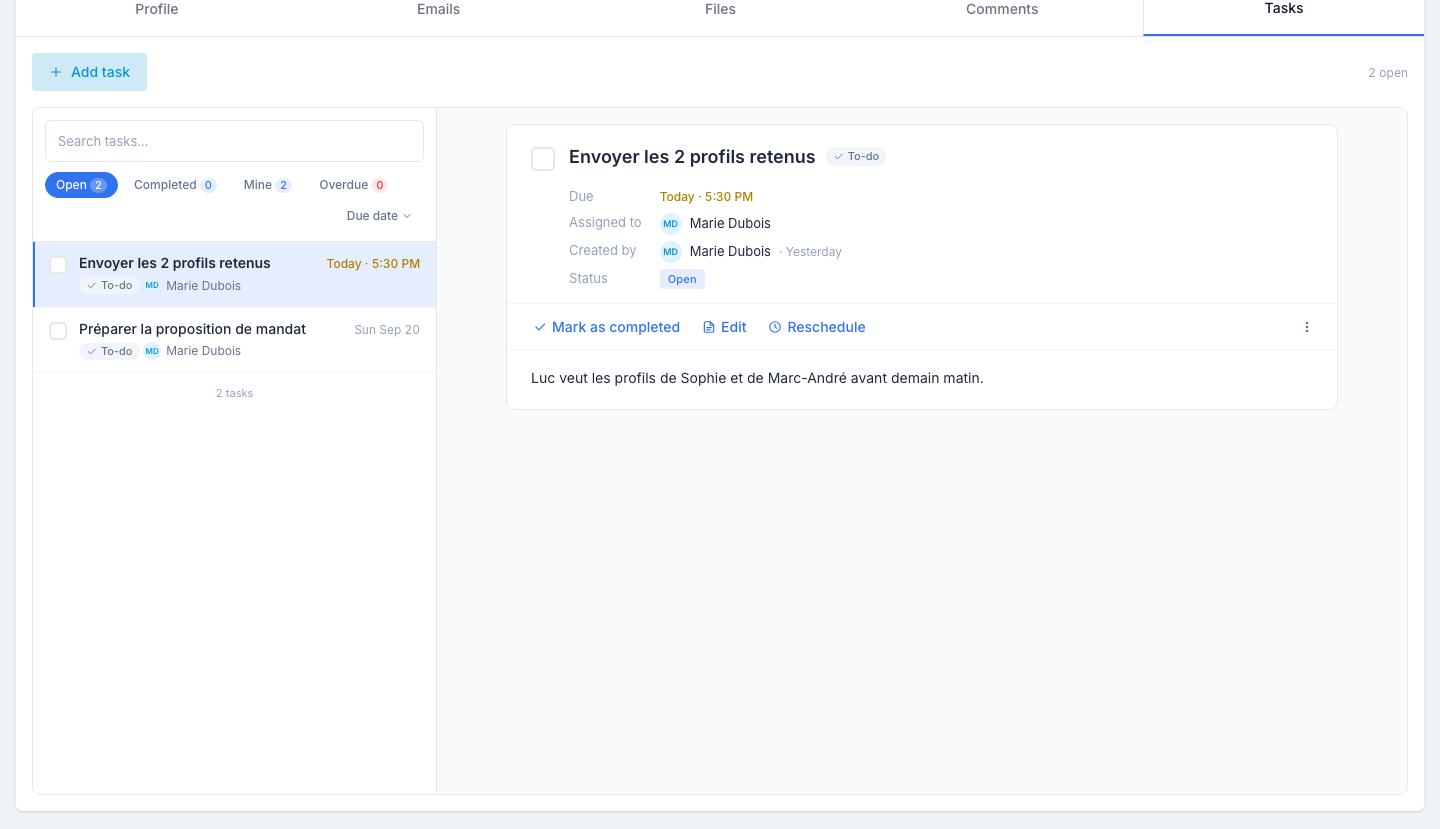
The list
One row per task: a checkbox, the title, the due date (red when past, amber when today), the type — To-do, Call or Email — and the owner.
Above it: a search, the Open · Completed · Mine · Overdue chips with their counts, and the Due date sort (soonest first; click to flip). The tab opens on the open tasks.
A task’s detail
Click a row. On the right: the title and type, then Due, Assigned to, Created by and Status, the description, and a row of actions:
- Mark as completed — ticking the checkbox on the row does the same. The task moves under the Completed chip, struck through; Reopen brings it back.
- Edit — reopens the side panel.
- Reschedule — a new date and time, without going through the panel.
- Write the email — on an Email task, opens the client’s send panel with its contact picker, as from the Emails tab. It needs a contact with an email address.
- ⋯ → Delete — with a confirmation.
A Call task on a client shows no number — the phone numbers are on the client’s contacts.
Creating or editing a task
Click Add task. The panel asks for:
- Title — short and concrete (“Renew MSA” beats “Follow up”).
- Type — To-do, Call or Email. The type changes the action offered in the detail.
- Due date and Time.
- Assign to — a colleague; you by default.
- For — the client, already filled in.
- Description — free text, optional.
Nothing is sent when you save. The assignee sees the task in their daily reminder email on the morning it comes due — one email covering their candidate, client and job tasks together; client tasks are one section of it.
Where else tasks appear
- In the assignee’s My tasks app, grouped under Overdue, Today, This week or Later — open tasks only; completed ones stay here.
- On the Calendar view of My tasks, alongside candidate, contact and job tasks.
- In the My tasks card of the dashboard, for overdue tasks and those due today and tomorrow.
- Tasks created on one of the client’s contacts show up here too, listed with the client’s other tasks.
Tips
- One task per concrete action. “Send draft, then follow up” is two tasks — splitting them makes them satisfying to check off.
- Pair tasks with comments. When you complete a task, leave a short comment with the outcome.
- Use tasks for renewal reminders. An MSA expiring in 90 days is a perfect “Renew MSA before Q3” task scheduled today.
- Reassign when the account moves. If the client changes hands, reassign its open tasks to the new account manager — they get the reminders.